Accounting
Everything you need to close a period and hand figures to your bookkeeper: where the numbers live, which page to trust, and how to export them.
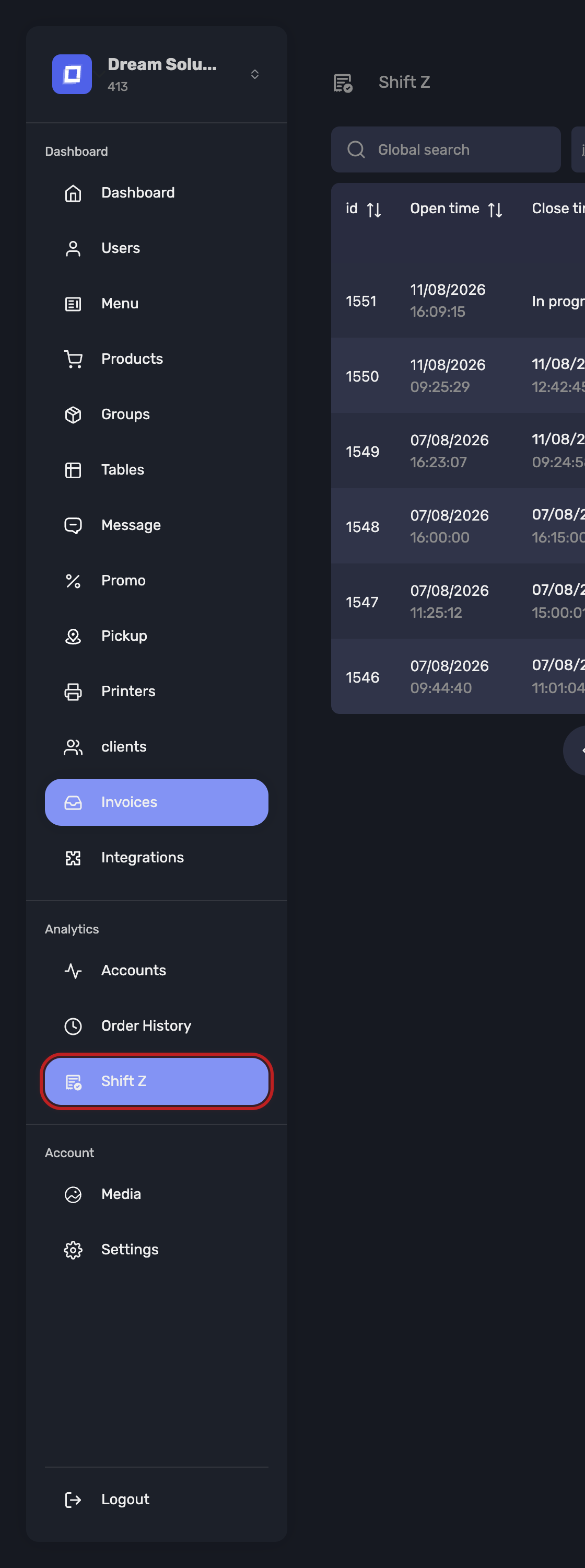
Accounting is done on Shift Z, in the sidebar. Not on Accounts, and not on Order History — the reason is below.
Do It on the Shifts Page
| Page | Searches by | Use it for |
|---|---|---|
| Shift Z | the trading session money was taken in | Accounting — takings, VAT, exports |
| Accounts | when an account was opened | Reviewing what was sold, and to whom |
| Order History | when a product was ordered | Product trends and pricing checks |
| Payments | each individual movement of money | Finding why a till does not balance |
Accounts and Order History are searched by when service happened, which is the right question for operational review and the wrong one for money. An account opened at 23:50 and paid at 00:20 lands in a different day on each page.
The shift pages follow the money: what was taken, by which payment type, at which VAT rate, in which session. That is what reconciles against your drawer, your card terminal and your VAT return.
Warning
Never build a financial report from Accounts or Order History. The totals will look plausible and will not match your takings.
Which Accounts Belong to a Shift
This differs between the two versions, and it is the single most important thing to understand before reporting.
| Version | An account joins a shift… | So a shift shows |
|---|---|---|
| Belgian SCE-certified | as soon as the first order is sent on it | everything opened during that shift, paid or not |
| International | when a payment is registered on it | what was paid during that shift |
In the International version an account that is open and unpaid belongs to no shift yet. It joins one at the moment it is paid.
In both versions, an account opened during one shift but paid during a later one counts in the shift where the payment happened. A table that stays open across a shift change moves with its payment, not with its order.
Warning
This is why a shift total and a count of accounts opened in the same hours will not agree in the International version — they are measuring different things. Neither is wrong.
Tip
If a period total looks short, look for accounts still open. In the International version their money has not landed in any shift yet.
Closing a Period
For a month, a week or a quarter:
1. Search the period
On Shift Z, set the Start Date and End Date to the period you are reporting.
2. Check every shift is closed
Anything still showing In progress... has no final figures. Chase it before you report — its takings are not settled.
3. Read the totals
The Total and VAT panels on the shift list cover the whole range you searched. There is nothing to add up by hand.
- Total — cash, card, transfer, offered, credit and error, and the overall total
- VAT — every rate that occurred, each with HVAT (excluding VAT), VAT, and Total
4. Open the statistics for the range
With a date range set, the statistics button opens the same view aggregated across the period.
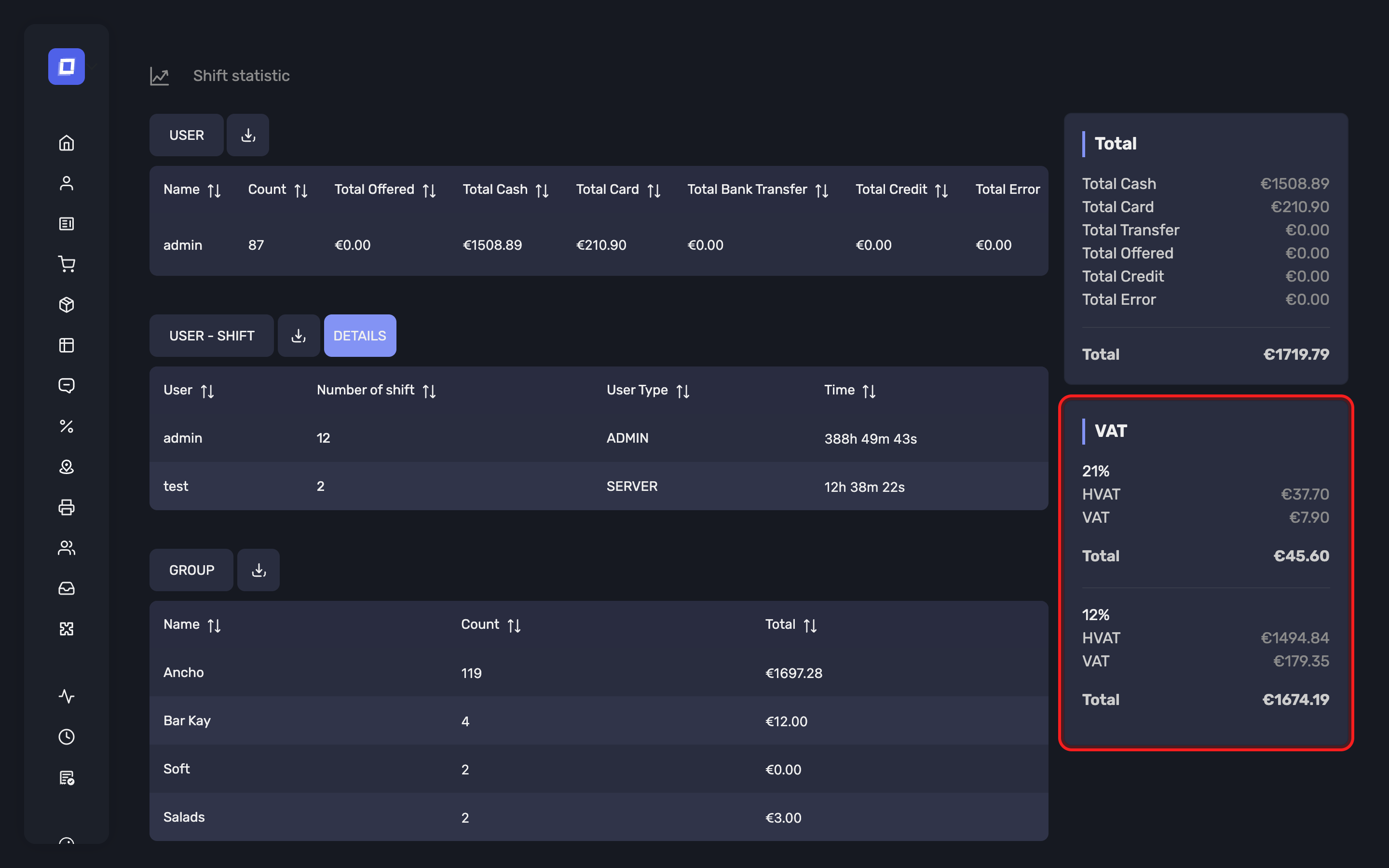
This is the full breakdown: takings per user, hours worked, sales per group and per product, and VAT per rate — all for the range, not one session.
5. Export what your bookkeeper needs
Each table downloads as CSV for the period:
| Export | Contains |
|---|---|
user_details |
Takings per member of staff, per payment type |
user_shift |
Shifts worked and total hours per person, from Shifts per user — your payroll figure, see Employee Shift Summaries |
group_details |
Revenue per product group |
parent_group_details |
The same rolled up, with VAT detail |
product_details |
Revenue per product |
shifts.csv |
The shift list itself |
6. Download the X or Z report
The Download action on the shift list offers Download X and Download Z alongside the CSV export, both for the searched period and from an individual shift. Both arrive as PDF documents, which is what you send to your accountant — see Reports and Exports.
Tip
Take the period report from here, not from the register. The Posbel app prints the Z of one shift at a time, as a paper ticket; it cannot total a week or a month. The panel adds the whole searched range into a single PDF, which is the form an accountant wants.
Each report breaks the shift down by product, by group, by parent group and by user. In every one of those tables the movements are split into four columns rather than being netted into one figure:
| Column | What it counts |
|---|---|
| Sales | Items sold |
| Refund | Items refunded to the customer |
| Correction | Items cancelled, reversed or re-priced after being registered |
| Other neg. | Remaining negative movements |
Each cell shows the amount and, in brackets, the number of units behind it. The Count and Total columns on the right stay the net result.
A VAT by parent group table follows the parent-group breakdown, so VAT can be read at the level you actually report on rather than product by product.
Tip
The split is what makes a shift explainable. A group whose total looks low because of one large correction reads very differently from one that simply sold less — netted into a single figure, the two are indistinguishable.
Warning
In the Belgian SCE-certified version, the authoritative X and Z reports are the ones produced by the register, not by the Posbel Admin panel — see Shop Shift. Take anything you file or hand to an inspector from the register.
When a Figure Looks Wrong
Work down, not across:
- Shift Z — which session is out?
- That shift's statistics — which user, group or product?
- That shift's accounts — which tickets?
- That account's Payment Transactions — which individual movements, including change returned? See Payment Totals
Tip
Reconcile per shift rather than per day. A discrepancy inside one session is traceable to the people and accounts in it; a discrepancy across a whole day rarely is.
What These Figures Are Not
Warning
The figures in the Posbel Admin panel are operational reporting, not certified accounting records. They are for running the business and preparing your books.
For official reporting or an audit under Belgian SCE certification, use the signed VAT ticket and the Z report produced by the Posbel app. See Shop Shift.
Summary
- Accounting is done on Shift Z; Accounts and Order History search by service time, not money
- A shift contains what was paid in it (International) or what was opened in it (certified)
- Set a date range and the totals and VAT for the whole period are read directly
- Six CSV exports cover staff, hours, groups, products and the shift list
- Certified establishments take their official figures from the register, not from here